• Expansions
  • Samples
  • Plugins
  • Free

Install & Activate Plugins

  • Layers Pro and Sunset Pianos Samples Folder Download Links
  • Lofi Panda Crash + No Sound
  • Lofi Panda Not Opening In Logic Pro / GarageBand
  • Lofi Panda 3.4 Update – What’s New – Installation
  • GarageBand Not Showing Lofi Panda
  • License Key Not Working – Submit Button Not Working
  • Lofi Panda 3.2 Update – What’s New – Installation
  • Plugin Not Loading After Installation
  • Activating On Multiple Computers
  • Installer Package Not Working on Mac
  • Install & Activate Lofi Panda 3
  • DreamFi User Manual

Account & orders

  • Checkout Not Working
  • Download Link Showing Page Of Code
  • Contact Support
  • Unlocking Plugins – Serial Number Issues
  • Creating An Account
  • Password Reset Issues
  • Coupon Codes

Technical

  • Lofi Panda 3 Documentation
  • Playback Issues, Glitching, Notes Skipping
  • DAW Is Not Finding Lofi Panda 3
  • Lofi Panda Update 3.8
  • Download Link Showing Page Of Code
  • Contact Support
  • Citrus Crusher Full Documentation
  • How To Uninstall Lofi Panda On Mac
  • Troubleshooting DAW Crash With Lofi Panda
  • Lofi Panda Crash + No Sound
  • Sample Directory Can Not Be Found Error
  • Downloading Issues – Samples Folder Download Issue
  • How To Open Lofi Panda In Pro Tools

General Questions

  • Lofi Panda 2 Upgrade Offer
  • What payment options are available – Payment & Shipping
  • What Software & DAWs Is Lofi Panda Compatible With?
  • What Is A DAW? What Software Does Lofi Panda Work In?

Tutorials

  • Opening Lofi Panda In Logic – Beginner’s Guide
  • Making A Beat With Lofi Panda
  • Resize Lofi Panda Screen Size
  • Assigning & Controlling MIDI CC Parameters
  • How To Open Lofi Panda In Pro Tools
  • Saving Your Own User Presets

Expansions

  • Bedroom Beats Mac Installer Stuck

Layers Full Documentation

  • Known Bugs Inside Layers
  • Import Samples Tutorial
  • Plugin Crashing
  • Mixing System
  • Arpeggiator System
  • Modulation System
  • FX System
  • Main User Interface
  • Install and Setup Layers
  • Welcome Layers
View Categories

Update Release Date: January 7th, 2026

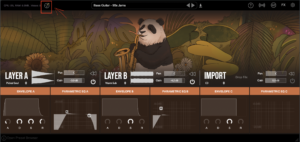
Lazy Load Function

We added a new button called ‘Lazy Load’. When selected it will speed up loading time when switching between presets. It will also reduce memory and CPU usage.
4 New FXs + Degrader Retired

For now, the degrader FX has been retired 🙁

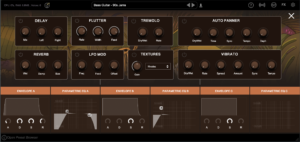
However, 4 new FXs have been added.

  • Tremolo
  • Textures – Control static textures that overlay the playback audio
  • Auto Panner
  • Vibrato

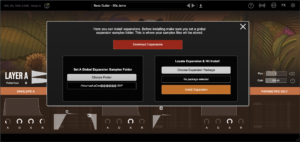
Expansions Ecosystem Optimized

A brand new expansion ecosystem has been built.

  • Set Global Expansions Folder: You can now select a global expansions samples folder. This will be the main folder all expansion samples are stored in. You can set it to an external hard-drive.
  • Install Expansions Right Inside Lofi Panda: Expansions now will come shipped as .hr1 files. You will now be able to upload and install them directly inside Lofi Panda
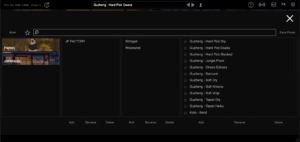
Preset Browser Expansions Tab

Now you will be able to select through expansions directly in the preset browser
Optimizations

With this update a lot of the backend code and structure has been optimized and streamlined. Resulting in smoother workflow and playback. Light UI changes have been made as well including a new top bar and parameter labels above knobs.


What are your Feelings

Share This Article :

  • Facebook
  • X
  • LinkedIn
  • Pinterest
Updated on January 6, 2026
Download Link Showing Page Of Code
Table of Contents
  • Lazy Load Function
  • 4 New FXs + Degrader Retired
  • Expansions Ecosystem Optimized
  • Preset Browser Expansions Tab
  • Optimizations

© 2026 Clark Pro Audio, LLC  About –  Support –  Privacy Policy – Terms – Refund Policy – Affiliate Program –  Blog