
• Expansions
  • Samples
  • Plugins
  • Free

Install & Activate Plugins

  • Layers Pro and Sunset Pianos Samples Folder Download Links
  • Lofi Panda Crash + No Sound
  • Lofi Panda Not Opening In Logic Pro / GarageBand
  • Lofi Panda 3.4 Update – What’s New – Installation
  • GarageBand Not Showing Lofi Panda
  • License Key Not Working – Submit Button Not Working
  • Lofi Panda 3.2 Update – What’s New – Installation
  • Plugin Not Loading After Installation
  • Activating On Multiple Computers
  • Installer Package Not Working on Mac
  • Install & Activate Lofi Panda 3
  • DreamFi User Manual

Account & orders

  • Checkout Not Working
  • Download Link Showing Page Of Code
  • Contact Support
  • Unlocking Plugins – Serial Number Issues
  • Creating An Account
  • Password Reset Issues
  • Coupon Codes

Technical

  • Lofi Panda 3 Documentation
  • Playback Issues, Glitching, Notes Skipping
  • DAW Is Not Finding Lofi Panda 3
  • Lofi Panda Update 3.8
  • Download Link Showing Page Of Code
  • Contact Support
  • Citrus Crusher Full Documentation
  • How To Uninstall Lofi Panda On Mac
  • Troubleshooting DAW Crash With Lofi Panda
  • Lofi Panda Crash + No Sound
  • Sample Directory Can Not Be Found Error
  • Downloading Issues – Samples Folder Download Issue
  • How To Open Lofi Panda In Pro Tools

General Questions

  • Lofi Panda 2 Upgrade Offer
  • What payment options are available – Payment & Shipping
  • What Software & DAWs Is Lofi Panda Compatible With?
  • What Is A DAW? What Software Does Lofi Panda Work In?

Tutorials

  • Opening Lofi Panda In Logic – Beginner’s Guide
  • Making A Beat With Lofi Panda
  • Resize Lofi Panda Screen Size
  • Assigning & Controlling MIDI CC Parameters
  • How To Open Lofi Panda In Pro Tools
  • Saving Your Own User Presets

Expansions

  • Bedroom Beats Mac Installer Stuck

Layers Full Documentation

  • Known Bugs Inside Layers
  • Import Samples Tutorial
  • Plugin Crashing
  • Mixing System
  • Arpeggiator System
  • Modulation System
  • FX System
  • Main User Interface
  • Install and Setup Layers
  • Welcome Layers
View Categories

Samples Folder Not Found After Installing

If you just installed the plugin and you get a message that the samples folder can not be found first make sure you restart the plugin after locating samples folder. This will allow the plugin to refresh.

If you still see the message after restarting this usually means the plugin is not finding the samples folder or there is an issue with your samples folder.

To check where the plugin is looking for the samples folder go into Lofi Panda and click the settings icon.
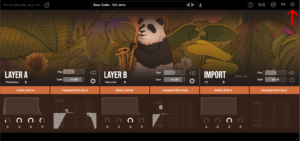
Once inside settings, scroll down on the right hand settings panel until you see “Sample Location:”
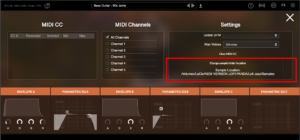
Confirm if this location is the location your samples folder is currently stored. Your samples folder should be unzipped and contain several .ch1 files inside. The location should point directly to that folder.

If the location is not pointing to the right location of your samples folder you can change it by clicking “Change sample folder location” then pointing to the right location
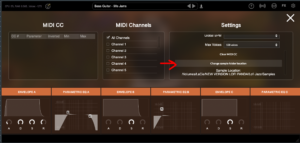
If you installed this folder on an external hard drive please make sure the hard drive is connected before opening the plugin. The plugin will not find the folder on the hard drive unless it is connected.

Samples Folder Not Found 

This article assumes you have successfully installed Lofi Panda. However, after opening the program after a while you may receive the following message.

‘Sample Directory Can Not Be Found’ this means that Lofi Panda is not finding the ‘Lofi Panda Samples’ folder.

This issue is most likely due to the samples folder being moved. If you moved the ‘Lofi Panda Samples’ folder you need to redirect the plugin to it.

You can do this by going to the settings tab and clicking the ‘Change Samples Folder Location’ button

If you installed this folder on an external hard drive please make sure the hard drive is connected before opening the plugin. The plugin will not find the folder on the hard drive unless it is connected.

What are your Feelings

Share This Article :

  • Facebook
  • X
  • LinkedIn
  • Pinterest
Updated on February 13, 2026
Lofi Panda Crash + No SoundDownloading Issues – Samples Folder Download Issue
Table of Contents
  • Samples Folder Not Found After Installing
  • Samples Folder Not Found 

© 2026 Clark Pro Audio, LLC  About –  Support –  Privacy Policy – Terms – Refund Policy – Affiliate Program –  Blog