
Samples Folder Not Found After Installing
If you just installed the plugin and you get a message that the samples folder can not be found first make sure you restart the plugin after locating samples folder. This will allow the plugin to refresh.
If you still see the message after restarting this usually means the plugin is not finding the samples folder or there is an issue with your samples folder.
To check where the plugin is looking for the samples folder go into Lofi Panda and click the settings icon.
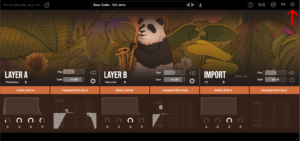
Once inside settings, scroll down on the right hand settings panel until you see “Sample Location:”
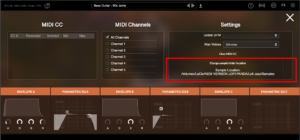
Confirm if this location is the location your samples folder is currently stored. Your samples folder should be unzipped and contain several .ch1 files inside. The location should point directly to that folder.
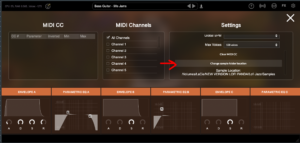
If the location is not pointing to the right location of your samples folder you can change it by clicking “Change sample folder location” then pointing to the right location
このフォルダを外付けハードドライブにインストールした場合は、プラグインを開く前にハードドライブが接続されていることを確認してください。ハードドライブが接続されていないと、プラグインはハードドライブ上のフォルダを見つけられません。
Samples Folder Not Found
この記事は、ロフィパンダが正常にインストールされていることを前提としています。しかし、しばらくしてからプログラムを開くと、次のようなメッセージが表示されることがあります。
Sample Directory Can Not Be Found」これはLofi Pandaが「Lofi Panda Samples」フォルダを見つけられないことを意味します。
この問題は、samplesフォルダが移動されたことが原因である可能性が高いです。もし「Lofi Panda Samples」フォルダを移動した場合は、プラグインをリダイレクトする必要があります。
設定タブで「サンプルフォルダーの場所を変更する」ボタンをクリックします。

このフォルダを外付けハードドライブにインストールした場合は、プラグインを開く前にハードドライブが接続されていることを確認してください。ハードドライブが接続されていないと、プラグインはハードドライブ上のフォルダを見つけられません。


