
Samples Folder Not Found After Installing
If you just installed the plugin and you get a message that the samples folder can not be found first make sure you restart the plugin after locating samples folder. This will allow the plugin to refresh.
If you still see the message after restarting this usually means the plugin is not finding the samples folder or there is an issue with your samples folder.
To check where the plugin is looking for the samples folder go into Lofi Panda and click the settings icon.
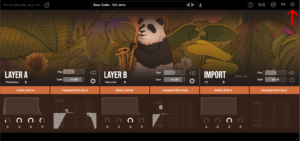
Once inside settings, scroll down on the right hand settings panel until you see “Sample Location:”
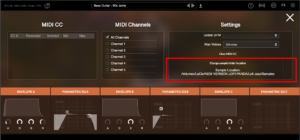
Confirm if this location is the location your samples folder is currently stored. Your samples folder should be unzipped and contain several .ch1 files inside. The location should point directly to that folder.
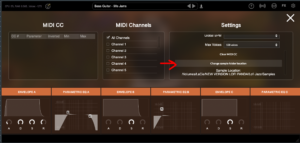
If the location is not pointing to the right location of your samples folder you can change it by clicking “Change sample folder location” then pointing to the right location
Se hai installato questa cartella su un disco rigido esterno, assicurati che il disco rigido sia collegato prima di aprire il plugin. Il plugin non troverà la cartella sul disco rigido se non è collegato.
Samples Folder Not Found
Questo articolo presuppone che tu abbia installato correttamente Lofi Panda. Tuttavia, dopo aver aperto il programma dopo un po' di tempo potresti ricevere il seguente messaggio.
Sample Directory Can Not Be Found" significa che Lofi Panda non riesce a trovare la cartella "Lofi Panda Samples".
Questo problema è probabilmente dovuto allo spostamento della cartella dei campioni. Se la cartella "Lofi Panda Samples" è stata spostata, devi reindirizzare il plugin verso di essa.
Puoi farlo andando nella scheda Impostazioni e cliccando sul pulsante "Cambia la posizione della cartella dei campioni".

Se hai installato questa cartella su un disco rigido esterno, assicurati che il disco rigido sia collegato prima di aprire il plugin. Il plugin non troverà la cartella sul disco rigido se non è collegato.


