
Samples Folder Not Found After Installing
If you just installed the plugin and you get a message that the samples folder can not be found first make sure you restart the plugin after locating samples folder. This will allow the plugin to refresh.
If you still see the message after restarting this usually means the plugin is not finding the samples folder or there is an issue with your samples folder.
To check where the plugin is looking for the samples folder go into Lofi Panda and click the settings icon.
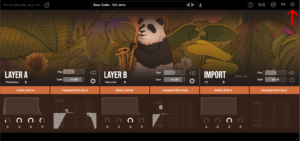
Once inside settings, scroll down on the right hand settings panel until you see “Sample Location:”
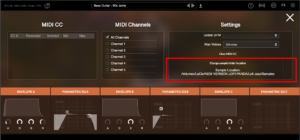
Confirm if this location is the location your samples folder is currently stored. Your samples folder should be unzipped and contain several .ch1 files inside. The location should point directly to that folder.
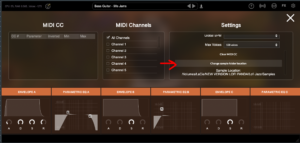
If the location is not pointing to the right location of your samples folder you can change it by clicking “Change sample folder location” then pointing to the right location
Se instalou esta pasta num disco rígido externo, certifique-se de que o disco rígido está ligado antes de abrir a aplicação. O plugin não encontrará a pasta no disco rígido se este não estiver ligado.
Samples Folder Not Found
Este artigo assume que instalou o Lofi Panda com sucesso. No entanto, depois de abrir o programa, após algum tempo, pode receber a seguinte mensagem.
'Sample Diretory Can Not Be Found' significa que o Lofi Panda não está a encontrar a pasta 'Lofi Panda Samples'.
Este problema deve-se muito provavelmente ao facto de a pasta de amostras ter sido movida. Se moveu a pasta 'Lofi Panda Samples', tem de redirecionar o plugin para a mesma.
Para tal, aceda ao separador "Definições" e clique no botão "Alterar a localização da pasta de amostras

Se instalou esta pasta num disco rígido externo, certifique-se de que o disco rígido está ligado antes de abrir a aplicação. O plugin não encontrará a pasta no disco rígido se este não estiver ligado.


