
Samples Folder Not Found After Installing
If you just installed the plugin and you get a message that the samples folder can not be found first make sure you restart the plugin after locating samples folder. This will allow the plugin to refresh.
If you still see the message after restarting this usually means the plugin is not finding the samples folder or there is an issue with your samples folder.
To check where the plugin is looking for the samples folder go into Lofi Panda and click the settings icon.
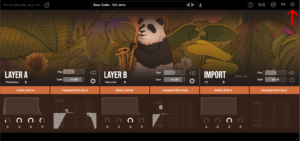
Once inside settings, scroll down on the right hand settings panel until you see “Sample Location:”
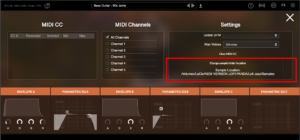
Confirm if this location is the location your samples folder is currently stored. Your samples folder should be unzipped and contain several .ch1 files inside. The location should point directly to that folder.
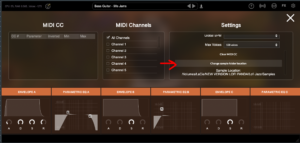
If the location is not pointing to the right location of your samples folder you can change it by clicking “Change sample folder location” then pointing to the right location
이 폴더를 외장 하드 드라이브에 설치한 경우 플러그인을 열기 전에 하드 드라이브가 연결되어 있는지 확인하세요. 하드 드라이브가 연결되어 있지 않으면 플러그인이 하드 드라이브에서 폴더를 찾지 못합니다.
Samples Folder Not Found
이 글에서는 로피 팬더를 성공적으로 설치했다고 가정합니다. 그러나 잠시 후 프로그램을 열면 다음과 같은 메시지가 표시될 수 있습니다.
'샘플 디렉토리를 찾을 수 없음'은 로피 팬더가 '로피 팬더 샘플' 폴더를 찾지 못한다는 의미입니다.
이 문제는 샘플 폴더를 이동했기 때문일 가능성이 높습니다. '로피 팬더 샘플' 폴더를 옮긴 경우 플러그인을 해당 폴더로 리디렉션해야 합니다.
설정 탭으로 이동하여 '샘플 폴더 위치 변경' 버튼을 클릭하면 됩니다.

이 폴더를 외장 하드 드라이브에 설치한 경우 플러그인을 열기 전에 하드 드라이브가 연결되어 있는지 확인하세요. 하드 드라이브가 연결되어 있지 않으면 플러그인이 하드 드라이브에서 폴더를 찾지 못합니다.


