
Samples Folder Not Found After Installing
If you just installed the plugin and you get a message that the samples folder can not be found first make sure you restart the plugin after locating samples folder. This will allow the plugin to refresh.
If you still see the message after restarting this usually means the plugin is not finding the samples folder or there is an issue with your samples folder.
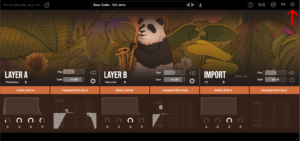
To check where the plugin is looking for the samples folder go into Lofi Panda and click the settings icon.
Once inside settings, scroll down on the right hand settings panel until you see “Sample Location:”
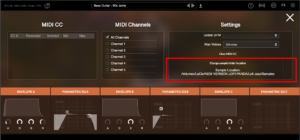
Confirm if this location is the location your samples folder is currently stored. Your samples folder should be unzipped and contain several .ch1 files inside. The location should point directly to that folder.
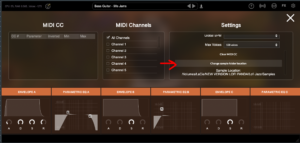
If the location is not pointing to the right location of your samples folder you can change it by clicking “Change sample folder location” then pointing to the right location
Si ha instalado esta carpeta en un disco duro externo, asegúrese de que el disco duro está conectado antes de abrir el complemento. El plugin no encontrará la carpeta en el disco duro a menos que esté conectado.
Samples Folder Not Found
Este artículo supone que ha instalado correctamente Lofi Panda. Sin embargo, después de abrir el programa después de un tiempo puede recibir el siguiente mensaje.
Directorio de muestras no encontrado" significa que Lofi Panda no encuentra la carpeta "Muestras Lofi Panda".
Lo más probable es que este problema se deba a que se ha movido la carpeta de muestras. Si ha movido la carpeta 'Lofi Panda Samples', debe redirigir el plugin a ella.
Para ello, vaya a la pestaña de configuración y haga clic en el botón "Cambiar la ubicación de la carpeta de muestras".

Si ha instalado esta carpeta en un disco duro externo, asegúrese de que el disco duro está conectado antes de abrir el complemento. El plugin no encontrará la carpeta en el disco duro a menos que esté conectado.


