
Samples Folder Not Found After Installing
If you just installed the plugin and you get a message that the samples folder can not be found first make sure you restart the plugin after locating samples folder. This will allow the plugin to refresh.
If you still see the message after restarting this usually means the plugin is not finding the samples folder or there is an issue with your samples folder.
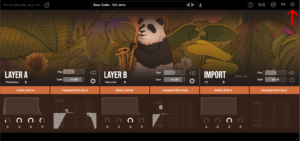
To check where the plugin is looking for the samples folder go into Lofi Panda and click the settings icon.
Once inside settings, scroll down on the right hand settings panel until you see “Sample Location:”
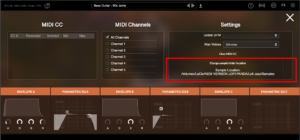
Confirm if this location is the location your samples folder is currently stored. Your samples folder should be unzipped and contain several .ch1 files inside. The location should point directly to that folder.
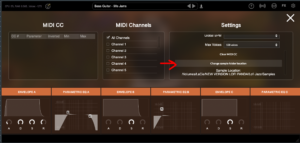
If the location is not pointing to the right location of your samples folder you can change it by clicking “Change sample folder location” then pointing to the right location
Jeśli zainstalowałeś ten folder na zewnętrznym dysku twardym, upewnij się, że dysk twardy jest podłączony przed otwarciem wtyczki. Wtyczka nie znajdzie folderu na dysku twardym, jeśli nie jest on podłączony.
Samples Folder Not Found
W tym artykule założono, że program Lofi Panda został pomyślnie zainstalowany. Jednak po otwarciu programu po pewnym czasie może pojawić się następujący komunikat.
"Sample Directory Can Not Be Found" oznacza, że Lofi Panda nie znajduje folderu "Lofi Panda Samples".
Problem ten jest najprawdopodobniej spowodowany przeniesieniem folderu próbek. Jeśli folder "Lofi Panda Samples" został przeniesiony, należy przekierować do niego wtyczkę.
Można to zrobić, przechodząc do zakładki ustawień i klikając przycisk "Zmień lokalizację folderu próbek".

Jeśli zainstalowałeś ten folder na zewnętrznym dysku twardym, upewnij się, że dysk twardy jest podłączony przed otwarciem wtyczki. Wtyczka nie znajdzie folderu na dysku twardym, jeśli nie jest on podłączony.


