
Samples Folder Not Found After Installing
If you just installed the plugin and you get a message that the samples folder can not be found first make sure you restart the plugin after locating samples folder. This will allow the plugin to refresh.
If you still see the message after restarting this usually means the plugin is not finding the samples folder or there is an issue with your samples folder.
To check where the plugin is looking for the samples folder go into Lofi Panda and click the settings icon.
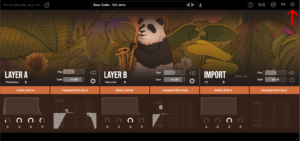
Once inside settings, scroll down on the right hand settings panel until you see “Sample Location:”
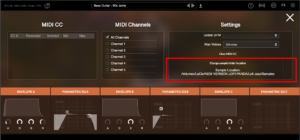
Confirm if this location is the location your samples folder is currently stored. Your samples folder should be unzipped and contain several .ch1 files inside. The location should point directly to that folder.
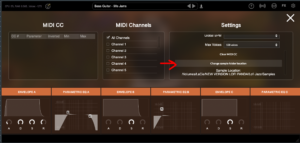
If the location is not pointing to the right location of your samples folder you can change it by clicking “Change sample folder location” then pointing to the right location
Wenn Sie diesen Ordner auf einer externen Festplatte installiert haben, stellen Sie bitte sicher, dass die Festplatte angeschlossen ist, bevor Sie das Plugin öffnen. Das Plugin findet den Ordner auf der Festplatte nicht, wenn diese nicht angeschlossen ist.
Samples Folder Not Found
Dieser Artikel geht davon aus, dass Sie Lofi Panda erfolgreich installiert haben. Allerdings kann es sein, dass Sie nach dem Öffnen des Programms nach einer Weile die folgende Meldung erhalten.
Sample Directory Can Not Be Found" bedeutet, dass Lofi Panda den Ordner "Lofi Panda Samples" nicht findet.
Dieses Problem ist höchstwahrscheinlich darauf zurückzuführen, dass der Samples-Ordner verschoben wurde. Wenn Sie den Ordner "Lofi Panda Samples" verschoben haben, müssen Sie das Plugin dorthin umleiten.
Gehen Sie dazu auf die Registerkarte "Einstellungen" und klicken Sie auf die Schaltfläche "Speicherort des Probenordners ändern".

Wenn Sie diesen Ordner auf einer externen Festplatte installiert haben, stellen Sie bitte sicher, dass die Festplatte angeschlossen ist, bevor Sie das Plugin öffnen. Das Plugin findet den Ordner auf der Festplatte nicht, wenn diese nicht angeschlossen ist.


